
 Hindi is my mother tongue. I can speak or write Hindi fluently but can’t type using computer keyboard. Now now with the help of Quillpad, I can type text in Hindi using normal English qwerty keyboard. Quillpad is a free online Indian language typing tool where you have to type in Hindi, Gujarati, Punjabi, Marathi, Telugu, Tamil, Kannada, Malayalam, Bengali and Nepali, using the English keyboard. For example, when you type ‘mera naam Abhishek Hai’ in Hindi, Quillpad will convert it directly into the corresponding (Hindi) Devanagari script.
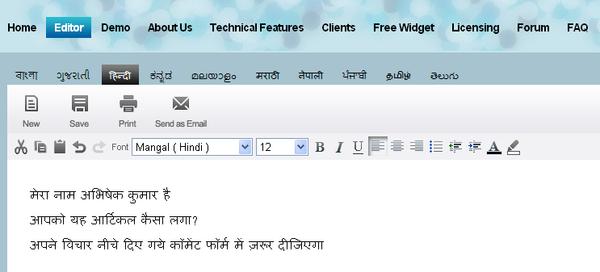
Quillpad has been developed by Tachyon, a technology company which works in the areas of Artificial Intelligence, and Programming Language Design, State of the art techniques in statistical machine learning etc. With the help of Quillpad, you can type Hindi, Kannada, Malayalam, Marathi, Tamil, Telugu, Bengali, Gujarati, Punjabi, Nepali. It is completely web-based so no need to install any software. Just you need one internet connection to your pc or laptop. Many web portals and search engines have integrated Quillpad to their web interface.
Famous companies which use Quillpad ::
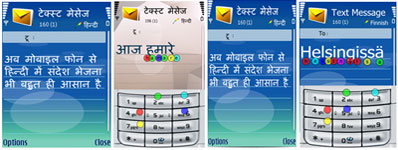
Nokia — Nokia has integrated Quillpad engine with its Front End Processor (FEP) technology makes the multi-language short message service (SMS) process seamless for S60 3rd Edition device users.
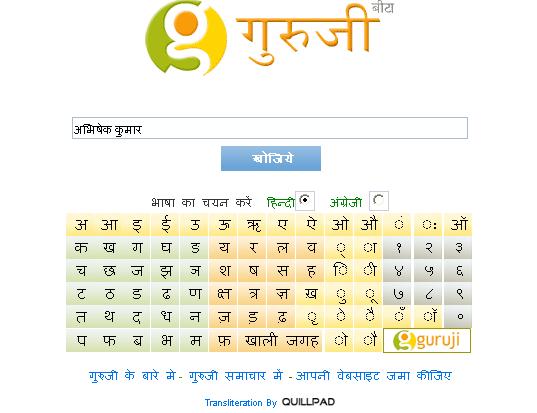
Guruji — The India Search engine, Guruji uses Quillpad for its Hindi and other regional languages search.
These are some other clients of Quillpad ::
Salient features of Quillpad ::
- My-mother-can-easily-type interface
- Intelligent engine that can automatically learn to transliterate multiple languages without the help of any human linguistics expert
- Ability to transliterate English words that are typed with conventional spellings
- Support for multiple languages
- Ability to work with other input interfaces like mobile keypads
You can also Add Quillpad into your website or blog. A script code along with an unique key would be sent to you, upon successful registration. Add that script code inside <body> </body> section of a desired page in your website. To enable Quillpad into any TEXT INPUT boxes of that page, add quillpad=”true” as its attribute.
See the demo of Quillpad
HINDI IS OUR MOTHER TOUNGE ,SO IT IS EASY TO WRITE AND THINK IN HINDI ,IT IS REALY GOOD ,THAT NOW IT IS AVAILABLE IN HINDI
Im new here and i enjoy music and movies alot , Hope lots of ppl like me here 🙂
Interesting….but I have been using the method mentioned here: (combination of Google Docs & Google Transliteration) to create spreadsheets and elaborate documents in Hindi. Check it out. It needs no software also…
You can also use Google Transliteration. it’s much easier to type in any Indian languages including Gujarati, Hindi, Marathi etc
Hi, Congratulations to the website buyer for this astonishing work you’ve done. It has lots of advantageous and absorbing data.
you write in top,so google now translate in hindi,but when google translate gujarati.
why you people not make it simple,so that an ordinery man with little knowledge of computer can understand clearly.amount of subskription is not mentioned.
Karel
hey ramratan karel…..first u should know english very well u have written subskription instead of “subcription”..correct ur word meaning
wonder full so easy to wrte poems in hindi
looooved it
I wanted to see quill pad key board. Is it possible to see and use such key board. It is alright to type in English and comming in hindi. but it is noted many words could not come exactly.
Hindi in my langauage and my hard iam best know in hindi and english But i like hindi
h
when i want write some thing then i want write in hindi because HINDI TOUCH MY HEART
w
Thanks a lot…….
I am looking for a software that can convertmy voice dictation into typying in Hindi/Nepali in my computer. I have abut 200 pages of writing in Nepali that I want to have it typed into my computer. But i cannot type i Hindi/Nepali. It is too slow a process for me to type it all by myself even though I could type Roman english that could type in Hindi/Nepali But again I would have to cut and paste. Can you help me please? I have read that India had developed a voice to text software in collaboartion with IBM but I cannot track it down. Can you help me with this. I would be obliged to you.
iam typing english keyboard but we want type hindi. please send hindi code and then we type hindi words from english keyboard